
The 2026 World Cup is happening across 16 stadiums in the US, Canada, and Mexico. I kept opening fixture lists, squinting at time zones, losing track of which venue was where. So I built a map — as a GitHub Copilot canvas extension.
But the interesting part isn’t the map. It’s how I use it.
What makes it a canvas
A “canvas” in Copilot is a UI that both you and the agent can see and manipulate at the same time. Think of it like a shared screen — except one of the people driving is an AI. The canvas renders in the Copilot desktop app’s side panel, but since it’s just a local web server under the hood, you can also open it in any browser. I did all my development from Copilot CLI and just pointed Edge at localhost:60698.
My extension shows a Leaflet + OpenStreetMap map with a pin for every match. Green for finished results, orange for upcoming fixtures. Click a pin and you get team badges, scores or kickoff times, venue, round, and a link out to highlights on YouTube. You can filter by status or team.
I can click around the map myself. Or I can tell the agent “focus on Mexico’s next match” and it pans the map for me. Same UI, two ways to drive it.
The Architecture
The extension runs a Node HTTP + SSE server that serves both the map UI and a /api/matches endpoint. The agent has three canvas actions it can invoke:
- refresh_matches — pull latest data and update all markers
- focus_match — pan/zoom to a specific match
- filter_matches — show only matches matching criteria (team, status, round)
These push live updates over Server-Sent Events. The canvas in GitHub Copilot’s desktop side panel receives them and re-renders instantly.
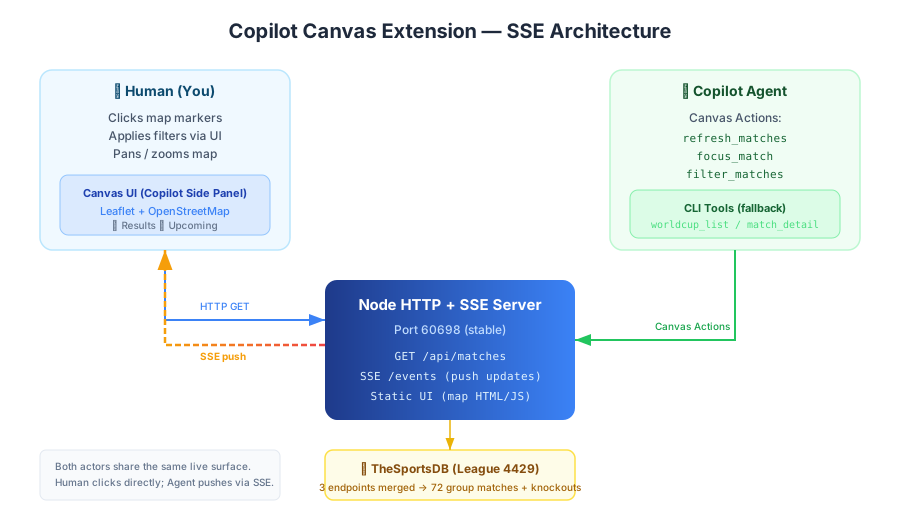
Plain CLI tools (worldcup_list_matches, worldcup_match_detail) also exist so the agent can answer match questions even with the canvas closed. The canvas is the rich interface; the CLI is the fallback.
Data Wrangling
Match data comes from TheSportsDB (league 4429, season 2026). Getting all 72 group-stage matches required merging three separate endpoints — events by round, next scheduled, and past results — then deduping by match ID. No single endpoint returns everything.
TheSportsDB events have no coordinates. I built a static lookup table mapping 16 host stadiums to lat/lng, with name aliases to handle variations (“Reliant Stadium” → NRG Stadium, “BC Place Stadium” → BC Place).
How I actually built it
Here’s my entire contribution to the initial build. I opened Copilot CLI and typed:
“I’m a big soccer fan and it’s currently the FIFA world cup, I’d like to build a copilot canvas extension that shows me the matches’ results and upcoming games, in a map control”
That’s it. One sentence. The agent spent the next 107 minutes figuring out the rest — spelunking the SDK’s .d.ts files to discover the canvas API, researching TheSportsDB endpoints, writing the Node server, wiring up SSE, building the Leaflet map, and handling all the coordinate lookups. I rejected one tool call (“no codebase yet, you’ll start from scratch”) and otherwise just watched.
After that, I spent maybe 20 more minutes iterating: fixing the two bugs I describe below, adding the team filter, tweaking the popup styling. But the core architecture — the SSE flow, the canvas actions, the data merging — all came from that one prompt.
What the agent figured out
Watching the agent work through problems in real time was half the fun:
“Only results, no upcoming matches.” The agent hit a wall: TheSportsDB’s past-events endpoint only returns finished matches, and the next-events endpoint only returns scheduled ones. Neither returns both. Its fix: merge all three feeds, dedupe on ID. I just said “there should be upcoming games too” and it root-caused the data source on its own.
“Canvas server doesn’t seem to be running.” Each time the extension reloaded during development, it bound a new ephemeral port — orphaning any canvas tab still pointing at the old one. The agent figured out the fix: bind a stable port (60698) with EADDRINUSE fallback so the canvas URL stays constant across reloads.
Discovering the canvas API itself. Canvas extensions aren’t heavily documented yet. The agent found createCanvas and joinSession by spelunking the SDK’s bundled .d.ts type definition files. The types were the map.
Try It
The extension is open source on GitHub. Install by cloning into your Copilot extensions directory:
# User scope (just you)
git clone https://github.com/asklar/worldcup-map-canvas-2026 ~/.copilot/extensions/worldcup-map

# Team scope (shared repo)
git clone https://github.com/asklar/worldcup-map-canvas-2026 .github/extensions/worldcup-map
It works in the GitHub Copilot desktop app or any browser pointed at the local server.
The World Cup runs through July 19. The map updates live. And if I want to know when Uruguay plays next — I just ask.
I write about building with AI agents, the stuff that actually works and the stuff that breaks. Follow me on LinkedIn for more.